




한국어

IPPBX/GW

온누리070 플레이스토어 다운로드
    acrobits softphone
     온누리 070 카카오 프러스 친구추가온누리 070 카카오 프러스 친구추가친추
     카카오톡 채팅 상담 카카오톡 채팅 상담카톡
    
     라인상담
     라인으로 공유

     페북공유

   ◎위챗 : speedseoul


     PAYPAL
     
     PRICE
     

pixel.gif

    before pay call 0088 from app


Setup Asterisk 13 with FreePBX 13 in CentOS 7

2017.08.24 11:55

admin 조회 수:25917

http://ijasnahamed.blogspot.kr/2017/04/setup-asterisk-13-with-freepbx-13-in.html


Launch CentOS 7 AWS Ec2 Instance

  1. Log in to your aws console
  2. Go to ec2 management page and click Launch Instance on Instance page
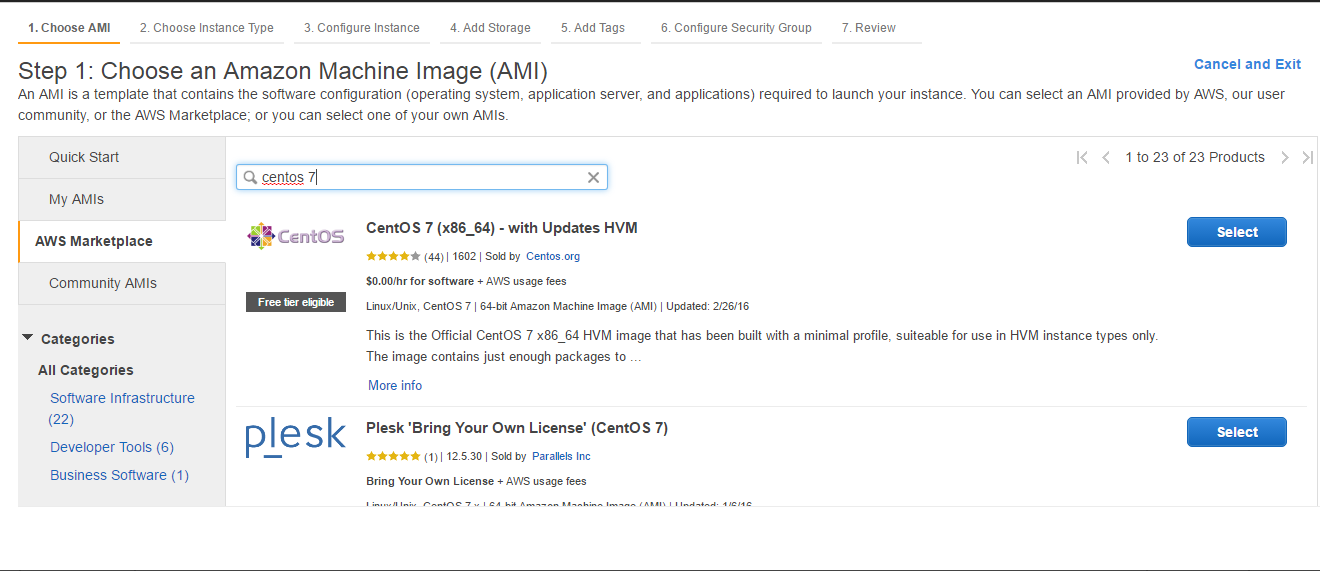
  3. In Choose AMI step, go to AWS MarketPlace tab and search CentOS 7 on search field. List of centos 7 ami's will be available.
  4. Select CentOS 7 (x86_64) ami which is free tier eligible.
  5. Select your instance type and click configure instance. Keep default values from Configure Instance to Add Tags steps
  6. In configure security group, create a security group which allow minimum ports open
    1. SSH : port 22
    2. HTTP : port 80
    3. Custom UDP Rule : 10000-20000 (if you are giving RTP ports 10000-20000)
    4. Custom UDP Rule : 5060 (ChanSIP port)
    5. Custom TCP Rule : 5060 (ChanSIP Port)
  7. Click Launch Instance. Select your key file and accept terms to launch instance.
Setup CentOS Server

  1. SSH into newly created CentOS server with username centos and your key file.
  2. Update all existing packages
    1. sudo yum update -y
  3. Now start http service(you can access your server via browser by going to your server ip address)
    1. sudo systemctl enable httpd.service
    2. sudo systemctl start httpd.service
  4. If you are using nano editor, please install it because its not inbuilt installed. If you use vi, skip this step
    1. yum install nano

Install Asterisk

Please execute below as root user.
  1. Please disable selinux to avoid strange behavior during installation
    1. Run ‘sestatus’ to check selinux state
      1. if enabled, please run below commands
        1. sed -i 's/\(^SELINUX=\).*/\SELINUX=disabled/' /etc/sysconfig/selinux
        2. sed -i 's/\(^SELINUX=\).*/\SELINUX=disabled/' /etc/selinux/config
        3. Reboot
      2. If disabled, run step 2
  2. Run below commands
    1. yum -y update
    2. yum -y groupinstall core base "Development Tools"
  3. Now install prerequisite packages
    1. yum -y install lynx mariadb-server mariadb php php-mysql php-mbstring tftp-server
    2. yum -y install httpd ncurses-devel sendmail sendmail-cf sox newt-devel libxml2-devel libtiff-devel
    3. yum -y install audiofile-devel gtk2-devel subversion kernel-devel git php-process crontabs cronie
    4. yum -y install cronie-anacron wget vim php-xml uuid-devel sqlite-devel net-tools gnutls-devel php-pear unixODBC mysql-connector-odbc
    5. yum -y install gcc gcc-c++ make openssl-devel libtermcap-devel perl curl curl-devel
    6. yum -y install libtool-ltdl libtool-ltdl-devel unixODBC-devel
    7. yum -y install bison doxygen mlocate tar nmap bzip2 mod_ssl php-mcrypt flex screen libxml2 libtiff gmime gmime-devel net-snmp-utils net-snmp-devel neon openssl gnutls-utils
    8. pear install Console_Getopt
  4. Check if firewall is running or not by executing systemctl status firewalld
    1. If you see this error ‘if it shows Unit Firewalld.service could not be found.’, install firewall by below commands
      1. yum install firewalld
      2. systemctl start firewalld (start firewall service)
    2. Open firewall port 80 and reload it
      1. firewall-cmd --zone=public --add-port=80/tcp --permanent
      2. firewall-cmd --reload
  5. Enable mariadb (freepbx use mariadb to log cdr reports)
    1. systemctl enable mariadb.service
    2. systemctl start mariadb
  6. Secure mysql installation by running mysql_secure_installation
    1. By default there won't be any password
    2. Don't set root password because freepbx will secure automatically
    3. Choose yes to remaining options. This will remove sample users and database, disable remote root logins and reload new rules so that mysql will take our changes immediately
  7. Reboot the server
  8. After rebooting, create a new user named asterisk
    1. adduser asterisk -M -c "Asterisk User"
  9. Execute below commands to install jansson
    1. cd /usr/src/
    2. git clone https://github.com/akheron/jansson.git
    3. cd /usr/src/jansson
    4. autoreconf -i
    5. ./configure
    6. make
    7. make install
  10. Now install pjproject by running below commands
    1. cd /usr/src
    2. wget http://www.pjsip.org/release/2.4/pjproject-2.4.tar.bz2
    3. tar -xjvf pjproject-2.4.tar.bz2
    4. rm -f pjproject-2.4.tar.bz2
    5. cd pjproject-2.4
    6. CFLAGS='-DPJ_HAS_IPV6=1' ./configure --prefix=/usr --enable-shared --disable-sound --disable-resample --disable-video --disable-opencore-amr --libdir=/usr/lib64
    7. make dep
    8. make
    9. make install
  11. Now install asterisk
    1. cd /usr/src
    2. wget http://downloads.asterisk.org/pub/telephony/asterisk/asterisk-13-current.tar.gz
    3. tar xvfz asterisk-13-current.tar.gz
    4. cd asterisk-13.*
    5. cd ./contrib/scripts
    6. ./install_prereq install
    7. ./install_prereq install-unpackaged
    8. cd /usr/src/asterisk-13.*
    9. ./configure --libdir=/usr/lib64
    10. ./configure --with-pjproject --with-ssl --with-srtp
    11. contrib/scripts/get_mp3_source.sh
    12. make menuselect
      1. Now a screen will appear to select packages to install. Along with selected packages, please select below packages
        1. format_mp3(from add-ons tab)
        2. res_config_mysql, app_mysql, cdr_mysql (from Add-ons tab)
        3. res_odbc, func_odbc
        4. chan_pjsip (from Channel Driver tab)
      2. Press F12 to save this menu
    13. make
    14. make install
    15. make config
    16. ldconfig
    17. Start asterisk by systemctl start asterisk
      1. To know asterisk status, run systemctl status asterisk
    18. chkconfig asterisk off
  12. Now change asterisk directories to asterisk user
    1. chown asterisk. /var/run/asterisk
    2. chown -R asterisk. /etc/asterisk
    3. chown -R asterisk. /var/{lib,log,spool}/asterisk
    4. chown -R asterisk. /usr/lib/asterisk OR chown -R asterisk. /usr/lib64/asterisk
    5. chown -R asterisk. /var/www/
  13. To install freepbx, need to change some values to php and httpd
    1. sed -i 's/\(^upload_max_filesize = \).*/\120M/' /etc/php.ini
    2. sed -i 's/^\(User\|Group\).*/\1 asterisk/' /etc/httpd/conf/httpd.conf
    3. sed -i 's/AllowOverride None/AllowOverride All/' /etc/httpd/conf/httpd.conf
  14. Now restart apache
    1. systemctl restart httpd.service
  15. Make asterisk database(if required)
    1. ASTERISK_DB_PW='pa2sw0rd'
    2. mysqladmin -u root create asterisk
    3. mysqladmin -u root create asteriskcdrdb
    4. mysql -u root -e "GRANT ALL PRIVILEGES ON asterisk.* TO asteriskuser@localhost IDENTIFIED BY '${ASTERISK_DB_PW}';"
    5. mysql -u root -e "GRANT ALL PRIVILEGES ON asteriskcdrdb.* TO asteriskuser@localhost IDENTIFIED BY '${ASTERISK_DB_PW}';"
    6. mysql -u root -e "flush privileges;"
  16. Install freepbx
    1. cd /usr/src
    2. wget http://mirror.freepbx.org/modules/packages/freepbx/freepbx-13.0-latest.tgz
    3. tar xfz freepbx-13.0-latest.tgz
    4. rm -f freepbx-13.0-latest.tgz
    5. cd /usr/src/freepbx
    6. ./start_asterisk start
    7. ./install -n
      1. If this fails, reboot server and re-execute step 16.5 to 16.7
  17. Now install freepbx necessary packages
    1. fwconsole chown
    2. fwconsole ma installall
    3. fwconsole ma upgradeall
    4. fwconsole ma refreshsignatures
    5. fwconsole reload
    6. fwconsole restart
  18. Update firewall rules
    1. firewall-cmd --zone=public --add-port=5060/tcp --permanent
    2. firewall-cmd --zone=public --add-port=5060/udp --permanent
    3. firewall-cmd --reload
  19. Make freepbx to run on server startup
    1. Create  a file freepbx.service in /etc/systemd/system and add below code to it and save
    2. [Unit]
      Description=FreePBX VoIP Server
      After=mariadb.service
      [Service]
      Type=oneshot
      RemainAfterExit=yes
      ExecStart=/usr/sbin/fwconsole start
      ExecStop=/usr/sbin/fwconsole stop
      [Install]
      WantedBy=multi-user.target
    3. systemctl enable freepbx.service
    4. systemctl status freepbx

Configuring FreePBX

  1. If your server external ip is 1.2.3.4, then go to http://1.2.3.4 in your browser. This will be your freepbx web panel
  2. On first time, you will be asked to set administrator username and password.
  3. On setting admin credentials, login to admin panel with your admin credentials


번호 제목 글쓴이 날짜 조회 수
98 php memory and filesize increase upload wav admin 2019.06.25 9263
97 changing SIP drivers to CHAN_PJSIP Please err 에러 admin 2019.06.21 10326
96 /dev/mapper/ubuntu--vg-root filling up admin 2019.04.08 16506
95 Configuring Your PBX admin 2017.08.17 24809
94 how-to-freepbx-13-firewall-setup admin 2017.08.14 24928
93 RPi Text to Speech (Speech Synthesis) admin 2017.08.24 24981
92 Asterisk dialolan detail explan good easy clean admin 2017.08.26 24996
91 Asterisk/IVR/PBX/VoIP/Contact center/Voicebroadcast engineer admin 2017.08.25 25083
90 IVR actions asterisk admin 2017.08.31 25119
89 Asterisk 13 Debian 8 admin 2015.11.13 25186
88 github A2Billing is commercially supported by Star2Billing admin 2017.08.26 25219
87 Google letter agi admin 2017.08.26 25240
86 NAT 와 VoIP 시그널과 RTP 전송 영향 NAT와 방화벽/STUN/TURN/ICE/SBC admin 2017.08.19 25251
85 asterisk XactView V3-CRM Widget admin 2017.08.24 25272
84 FreePBX 12 – Getting Started Guide admin 2017.08.29 25278
83 Configuring an Asterisk server admin 2015.05.05 25282
82 download Installing+AsteriskNOW admin 2017.08.25 25294
81 User Control Panel (UCP) 14+ admin 2017.08.23 25306
80 Text to Speech User Guide admin 2017.08.24 25320
79 Insert into dialplan Asterisk admin 2017.08.26 25361
78 asterisk Chapter 6. Dialplan Basics admin 2017.08.25 25412
77 OPUS and VP9 Bitrates admin 2017.08.17 25431
76 Asterisk Downloads AsteriskNOW Software PBX admin 2015.05.05 25443
75 Capturing SIP and RTP traffic using tcpdump admin 2017.08.17 25444
74 asterisk FreePBX 14, Distro 14 & More! admin 2017.08.16 25481
73 asterisk freepbx TTS Engine Custom - Amazon Polly - 24 languages admin 2017.08.24 25497
72 Asterisk A simple IVR admin 2015.05.05 25498
71 Asterisk based auto dialer test and verified by 300+ concurrent. admin 2017.08.31 25506
70 Considerations for Using T.38 versus G.711 for Fax over IP file admin 2015.09.24 25578
69 asterisk IVR 쉽게 설정하기 admin 2017.08.16 25579
68 Top 10 greater worker admin 2017.08.26 25586
67 TwistedWave Online A browser-based audio editor admin 2017.08.25 25606
66 /sbin/service httpd start stop web start stop admin 2017.08.16 25614
65 Brand New Sealed Sangoma FreePBX 60 - 75 Users or 30 Calls admin 2017.08.05 25617
64 SUGAR CRM admin 2017.08.23 25621
63 Asterisk Freepbx Install Guide (CentOS v7, Asterisk v13, Freepbx v13) admin 2017.08.23 25623
62 FOIP: T.38 Fax Relay vs. G.711 Fax Pass-Through (Fax Over IP) admin 2015.09.24 25628
61 WombatDialer is highly scalable, multi-server, works with your existing Asterisk PBX. admin 2017.08.31 25631
60 Fax Configuration FREE PBX and asterisk FAX admin 2015.05.05 25632
59 AsterSwitchboard CTI Operator Panel for Asterisk admin 2017.08.08 25637
58 FreePBX – Custom FAX to email admin 2015.05.05 25661
57 thirdlane PBX price admin 2017.08.23 25678
56 Asterisk 설치 준비 admin 2015.11.15 25702
55 Generic Asterisk SIP Configuration Guide admin 2015.05.05 25732
54 FaxServer using Asterisk admin 2015.05.05 25745
53 HOW TO INSTALL FREEPBX ON CENTOS 7 admin 2017.08.24 25749
52 How to Install Asterisk 13 on Ubuntu 16.04 from Source admin 2017.08.23 25787
51 Installing FreePBX 14 on Debian 8.8 These instructions work fine admin 2017.08.29 25795
50 초보) Asterisk , AsteriskNow 무엇인가? 무슨차이인가? 시작 배우기 쉽게 이해 공부 사용 admin 2017.08.29 25798
49 Price ,,Install Commercial Modules on CentOS and RHEL based admin 2017.08.16 25811
48 fax licenses Asterisk admin 2015.05.05 25832
47 Incoming Fax Handling admin 2015.05.05 25835
46 A simple IVR and Queue example where customer listens to marketing materials .. admin 2015.05.05 25857
45 iptables for asterisk simple example configuration admin 2017.08.31 25859
44 How to install and setup Asterisk 14 (PBX) on CentOS 7 admin 2017.08.23 25903
» Setup Asterisk 13 with FreePBX 13 in CentOS 7 admin 2017.08.24 25917
42 FAX over IP sofware admin 2015.05.05 25938
41 MP3 to WAV, WMA to WAV, OGG Convert audio to WAV online admin 2015.05.09 25977
40 Installing SNG7 Official Distro admin 2017.08.17 26021
39 Asterisk Answering Machine Detection (AMD) Configuration admin 2017.08.17 26033
38 Fax For Asterisk download add on 1 port free IVR prompt G.729 admin 2015.05.05 26052
37 T.38 Fax Gateway Asterisk admin 2015.05.05 26086
36 우분투 Mumble VoIP 음성채팅서버 구축 admin 2017.08.18 26093
35 음성통화 서버 Asterisk + FreePBX / 통화 시연해보기 admin 2017.08.18 26105
34 Smart Predictive Auto calling Software System: Automatic Phone Calling admin 2017.08.31 26141
33 Automatic Call Distribution (ACD) Asterisk as Call Center admin 2017.08.31 26186
32 Dialplan handler routines allow customization admin 2017.08.26 26301
31 Using Asterisk to Detect and Redirect Fax Calls for Communications Server admin 2015.05.05 26325
30 Playing text to speech inside read function in asterisk admin 2017.08.28 26371
29 Asterisk Answering Machine Detection (AMD) Configuration admin 2017.09.01 26389
28 Setup FAX on Asterisk with DIDForSale SIP DIDs admin 2015.05.05 26422
27 Introducing Asterisk Call Distribution ACD asterisk admin 2017.08.31 26448
26 asterisk CRM SUGARCRM SuiteCRM admin 2017.08.24 26480
25 How to build an outbound Call Center with Newfies-Dialer and Asterisk/FreePBX admin 2017.08.31 26490
24 Setup install Asterisk PBX telephony system | VOIP Tutorial admin 2015.05.05 26526
23 AGI asterisk gateway interface synopsis admin 2017.08.26 26598
22 asterisk dialplan 설명 admin 2017.08.16 26651
21 Asterisk tips ivr menu Interactive voice response menus admin 2015.05.05 26653
20 User Control Panel (UCP) asterisk freepbx admin 2017.08.17 26840
19 Text to speech for asterisk using Google Translate admin 2017.08.24 26946
18 Speech Recognition on Asterisk: Getting Started admin 2017.08.28 27305
17 Hosting Cheap VPS Hosting that doesn’t feel cheap admin 2017.08.24 27323
16 Installing AsteriskNOW Official Distro admin 2015.05.05 27351
15 Freepbx on Debian (Debian v7, Asterisk v11, Freepbx v2.11) admin 2015.05.05 27766
14 VICIdial Scratch Installation CentOS 7 & MariaDB & Asterisk 11 & Latest VICIdial SVN admin 2017.09.02 27786
13 Asterisk 가장쉬운 설치 및 설정 사용 방법 이해 할수있게 배우는 순서 안내 설명 admin 2017.08.16 27963
12 Asterisk fax Asterisk and fax calls Fax over IP admin 2015.05.05 28219
11 Asterisk Quick Start Guide admin 2015.05.05 28275
10 A2Billing v2.2 Install Guide CentOS v7 Asterisk v11 v13 seems to work FreePBX v13 admin 2017.08.23 28621
9 List of 5 Open Source Call Center Software Programs admin 2017.08.31 28840
8 A2Billing v2 Install Guide admin 2015.05.05 29381
7 Asterisk Freepbx Install Guide (CentOS v6, Asterisk v13, Freepbx v12) admin 2015.05.05 30237
6 Fusionpbx v4 Freeswitch v1.6 CentOS v7 Install Guide admin 2017.08.23 30613
5 Securing Your Asterisk VoIP Server with IPTables admin 2015.05.05 31536
4 How to Install Asterisk on CentOS 7 easy clean explain 깔금한 쉬운 설명 admin 2017.08.23 31792
3 라즈베리파이, 아스타리스크(asterisk) PBX(사설교환기) admin 2017.08.23 33248
2 Asterisk AGI/AMI to ARI Asterisk&FreePbx - IVR setting admin 2015.05.05 35222
1 Make Your Own IVR with Asterisk admin 2017.08.26 39522